Introduction to the Revit API
Session 1
Tools and environment setup
- Pyrevit - an add-in for building your own add-ins, and a small toolbox in itself:
https://github.com/eirannejad/pyRevit/releases - RevitPythonShell - an interactive Python console in Revit:
https://github.com/architecture-building-systems/revitpythonshell/releases - stubs - autocompletion of Revit commands in VS Code:
https://www.macro4bim.com/post/create-python-stubs
https://github.com/gtalarico/ironpython-stubs - RevitLookup - a tool to inspect the parameters of Revit objects:
https://github.com/jeremytammik/RevitLookup - git - code versioning and teamwork, an all-in-one:
https://git-scm.com/
Where to learn
- https://www.revitapidocs.com/
- https://apidocs.co/apps/revit/2021/
- https://help.autodesk.com/view/RVT/2022/ENU/?guid=Revit_API_Revit_API_Developers_Guide_html
- https://thebuildingcoder.typepad.com/
- http://wiki.theprovingground.org/revit-api
- https://dynamopythonprimer.gitbook.io/
- https://www.youtube.com/channel/UC1Dx-jGyRbvvHzZ8ZyGWF5w/playlists
- https://github.com/gtalarico/python-revit-resources
- https://github.com/architecture-building-systems/revitpythonshell
- https://github.com/Amoursol/dynamoPython
- https://daren-thomas.gitbooks.io/scripting-autodesk-revit-with-revitpythonshell/content/
How to read scripts
#! python3- defines which language the script uses# -*- coding: utf-8 -*-- defines the UTF-8 Unicode character range (Polish letters included)
#! python3
# -*- coding: utf-8 -*-
import xyz
import abc
from foo import bar

CONSTANT_X = 1
CONSTANT_Y = False
CONSTANT_Z = None

def something(a,b,c):
    return a,b,c

def main():
    return something(a,b,c)

if __name__ == "__main__":
    main()
pipenv
pip install --user pipenv
pipenv install requests
pipenv run python main.py
pipenv shell
Using Python libraries
import sys
sys.path.append('path/to/modules')
The API and Python versions
- Dynamo API - IronPython 2.7 / Python 3.8, depending on the Dynamo version
- API RPSHELL (Python) - IronPython 2.7 / python 3.8
- API Macros - IronPython 2.7
Static and dynamic languages
Types (int, float, str, Object, Enum, Element, Id):
- static types
- dynamic types
API basics
Boilerplate for Dynamo scripts. DO NOT COPY THIS, seriously! :D
keyword: "Maintenance"
import clr # .NET's Common Language Runtime.

# Adding modules.
import sys
sys.path.append(r'C:\Program Files (x86)\IronPython 2.7\Lib')

# Adding standard types
import System
from System import Array
from System.Collections.Generic import *

# Adding standard Dynamo types
clr.AddReference('ProtoGeometry')
from Autodesk.DesignScript.Geometry import *

# Adding standard Dynamo-Revit types
clr.AddReference("RevitNodes")
import Revit
clr.ImportExtensions(Revit.Elements)
clr.ImportExtensions(Revit.GeometryConversion)

# Adding the TransactionManager and DocumentManager
clr.AddReference("RevitServices")
import RevitServices
from RevitServices.Persistence import DocumentManager
from RevitServices.Transactions import TransactionManager

# Adding the Revit API
clr.AddReference("RevitAPI")
clr.AddReference("RevitAPIUI")

import Autodesk
from Autodesk.Revit.DB import *
from Autodesk.Revit.UI import *

doc = DocumentManager.Instance.CurrentDBDocument
uiapp = DocumentManager.Instance.CurrentUIApplication
app = uiapp.Application
uidoc = uiapp.ActiveUIDocument
What does a foot have to do with Revit?
units
def feet_to_meter(feet):
    return feet * 0.3048


def meter_to_feet(meter):
    return meter / 0.3048


def sqr_feet_to_meter(sqrfeet):
    return sqrfeet * 0.09290304


def sqr_meter_to_feet(sqrmeter):
    return sqrmeter / 0.09290304
Another way to handle units
detail_line = UnwrapElement(IN[0])
decimal_feet_length = detail_line.GeometryCurve.Length
metric_length = UnitUtils.Convert(
    decimal_feet_length,
    DisplayUnitType.DUT_DECIMAL_FEET,
    DisplayUnitType.DUT_MILLIMETERS)
OUT = metric_length
API structure and exploration
import os
import types

def walker(lib, name, relations=None, limit=2):
    relations = [["", name, lib.__doc__]] if relations is None else relations
    IGNORE = [str, int, float, complex, list, tuple, range, dict, bool, bytes]
    if limit == 0:
        return relations
    else:
        limit -= 1
    for x in dir(lib):
        if not x.startswith("_"):
            try:
                a = getattr(lib, x)
                if type(a) not in IGNORE and name not in ["OSError", "Error"]:
                    el = [name, f"{name}.{x}", a.__doc__]
                    if el not in relations:
                        relations.append(el)
                        relations = walker(a, f"{name}.{x}", relations, limit=limit)
            except:
                pass
    return relations

##############################################################
import plotly.graph_objects as go
import plotly

relations = walker(plotly, "plotly")
parents, labels, helps = zip(*relations)

fig = go.Figure(
    go.Treemap(
        labels=labels,
        parents=parents,
        # values = helps,
    )
)

fig.update_layout(margin=dict(t=50, l=25, r=25, b=25))
plotly.offline.plot(fig, filename="./index.html")
fig.show()
Basic classes
Element.*
ArePhasesModifiable
AssemblyInstanceId
BoundingBox
CanBeHidden
CanBeLocked
CanDeleteSubelement
CanHaveAnalyticalModel
CanHaveTypeAssigned
Category
ChangeTypeId
CreatedPhaseId
DeleteEntity
DeleteSubelement
DeleteSubelements
DemolishedPhaseId
DesignOption
Dispose
Document
Equals
Geometry
GetAnalyticalModel
GetAnalyticalModelId
GetChangeTypeAny
GetChangeTypeElementAddition
GetChangeTypeElementDeletion
GetChangeTypeGeometry
GetChangeTypeParameter
GetDependentElements
GetEntity
GetEntitySchemaGuids
GetExternalFileReference
GetExternalResourceReference
GetExternalResourceReferences
GetGeneratingElementIds
GetGeometryObjectFromReference
GetHashCode
GetMaterialArea
GetMaterialIds
GetMaterialVolume
GetMonitoredLinkElementIds
GetMonitoredLocalElementIds
GetOrderedParameters
GetParameterFormatOptions
GetParameters
GetPhaseStatus
GetSubelements
GetType
GetTypeId
GetValidTypes
GroupId
HasPhases
Id
IsExternalFileReference
IsHidden
IsMonitoringLinkElement
IsMonitoringLocalElement
IsPhaseCreatedValid
IsPhaseDemolishedValid
IsTransient
IsValidObject
IsValidType
LevelId
Location
LookupParameter
MemberwiseClone
Name
OwnerViewId
Parameter
Parameters
ParametersMap
Pinned
ReferenceEquals
RefersToExternalResourceReference
RefersToExternalResourceReferences
ReleaseUnmanagedResources
SetEntity
ToString
UniqueId
VersionGuid
ViewSpecific
WorksetId
getBoundingBox
setElementType
Basic classes
Wall.*
ArePhasesModifiable
AssemblyInstanceId
BoundingBox
CanBeHidden
CanBeLocked
CanDeleteSubelement
CanHaveAnalyticalModel
CanHaveTypeAssigned
Category
ChangeTypeId
Create
CreatedPhaseId
CurtainGrid
DeleteEntity
DeleteSubelement
DeleteSubelements
DemolishedPhaseId
DesignOption
Dispose
Document
Equals
FindInserts
Flip
Flipped
Geometry
GetAnalyticalModel
GetAnalyticalModelId
GetChangeTypeAny
GetChangeTypeElementAddition
GetChangeTypeElementDeletion
GetChangeTypeGeometry
GetChangeTypeParameter
GetDependentElements
GetEntity
GetEntitySchemaGuids
GetExternalFileReference
GetExternalResourceReference
GetExternalResourceReferences
GetGeneratingElementIds
GetGeometryObjectFromReference
GetHashCode
GetMaterialArea
GetMaterialIds
GetMaterialVolume
GetMonitoredLinkElementIds
GetMonitoredLocalElementIds
GetOrderedParameters
GetParameterFormatOptions
GetParameters
GetPhaseStatus
GetStackedWallMemberIds
GetSubelements
GetType
GetTypeId
GetValidTypes
GroupId
HasPhases
Id
IsExternalFileReference
IsHidden
IsMonitoringLinkElement
IsMonitoringLocalElement
IsPhaseCreatedValid
IsPhaseDemolishedValid
IsStackedWall
IsStackedWallMember
IsTransient
IsValidObject
IsValidType
LevelId
Location
LookupParameter
MemberwiseClone
Name
Orientation
OwnerViewId
Parameter
Parameters
ParametersMap
Pinned
ReferenceEquals
RefersToExternalResourceReference
RefersToExternalResourceReferences
ReleaseUnmanagedResources
SetEntity
StackedWallOwnerId
StructuralUsage
ToString
UniqueId
VersionGuid
ViewSpecific
WallType
Width
WorksetId
getBoundingBox
setElementType
Pyrevit
- what it can do
- building a UI for a script
- setting up add-ins for a company (a developer pipeline)
Pyrevit

- Tab coloring - colours your tabs by open project and family. Minify Revit UI - hides the ribbon tabs you do not use, e.g. it leaves me only Architecture, Annotate and Modify (configured by SHIFT-clicking the icon).
- Sync Views - synchronises views: when you switch plans often (e.g. checking shafts), with this on the view always lands in the same place as on the previous plan (it resets e.g. when you open a 3D view).
- Advanced selection - works like a calculator's memory: select a few objects and add them to memory, select others and add them too; MRead then selects everything you stored.
- Make Pattern - quickly create hatch patterns, e.g. grass, paving, tiles.
- Sheets - my favourite is copying legends to other sheets (for permit or construction drawings: place the recurring legends on one sheet, then copy them to all the others and they land in the same spot). The other is Batch Sheet Maker: it quickly creates many sheets; you type the sheet number [tab] sheet name and the sheet is there (for construction drawings I keep the sheet list in a text file, paste it into this tool and get empty sheets with numbers and names right away).
- Lots of helpers here; the best is probably copying view templates to other open files.
- Preflight Checks - my favourite tool: it shows the "health" of your Revit file in a nice graphical form, and what could be improved.
- Team - an important check: Who did that? Who created an element and who edited it last.
- Cleanup that is sometimes too thorough, but at least it removes elements that Purge leaves behind.
Pyrevit
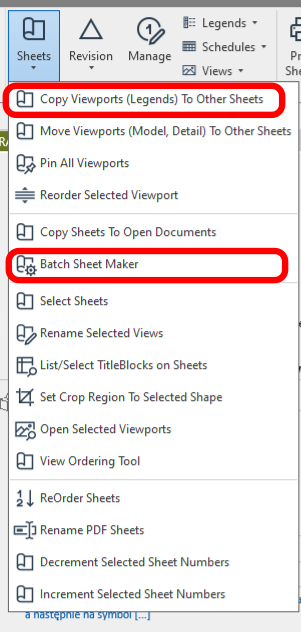
- Sheets - my favourite is copying legends to other sheets (for permit or construction drawings: place the recurring legends on one sheet, then copy them to all the others and they land in the same spot). The other is Batch Sheet Maker: it quickly creates many sheets; you type the sheet number [tab] sheet name and the sheet is there (for construction drawings I keep the sheet list in a text file, paste it into this tool and get empty sheets with numbers and names right away).
Pyrevit
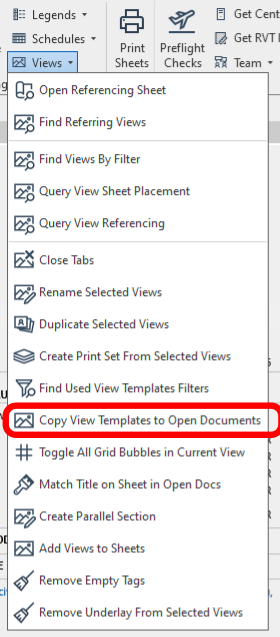
- Lots of helpers here; the best is probably copying view templates to other open files.
Pyrevit
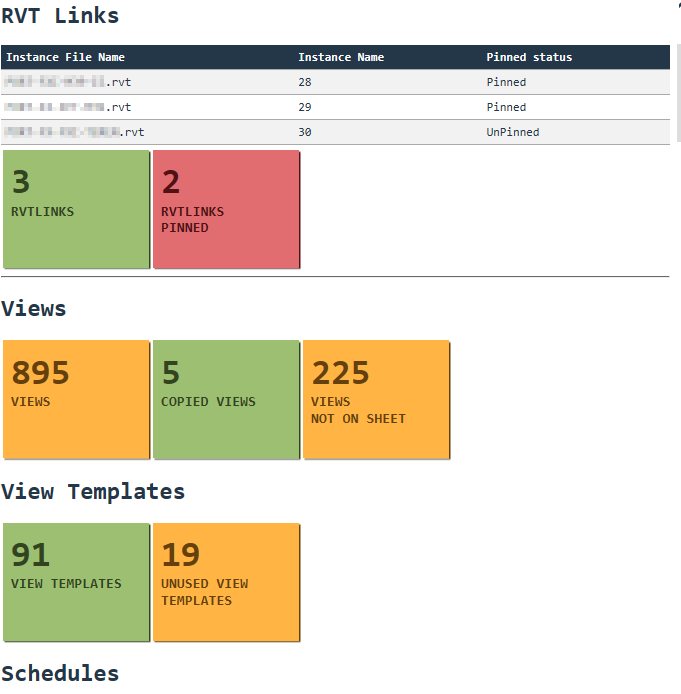
- Preflight Checks - my favourite tool: it shows the "health" of your Revit file in a nice graphical form, and what could be improved.
Pyrevit
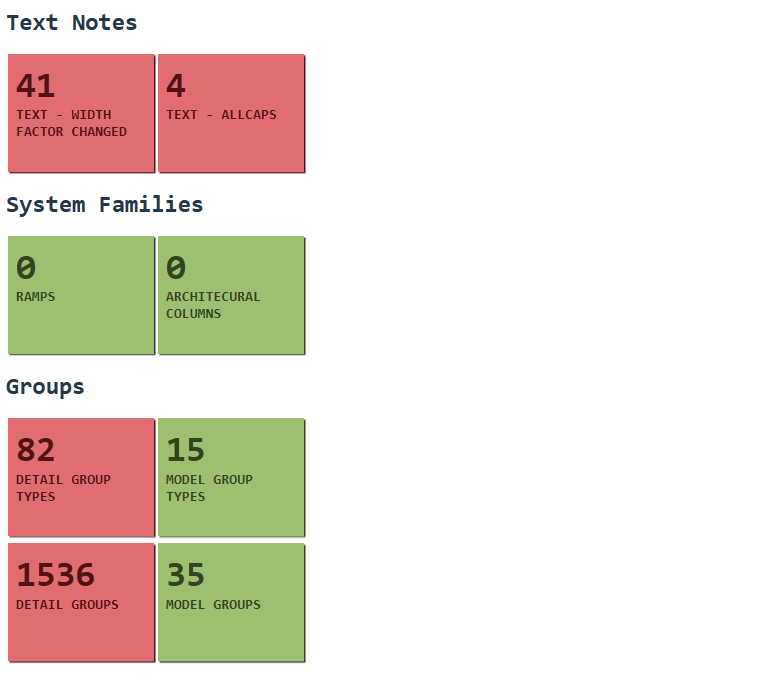
- Preflight Checks - my favourite tool: it shows the "health" of your Revit file in a nice graphical form, and what could be improved.
Pyrevit
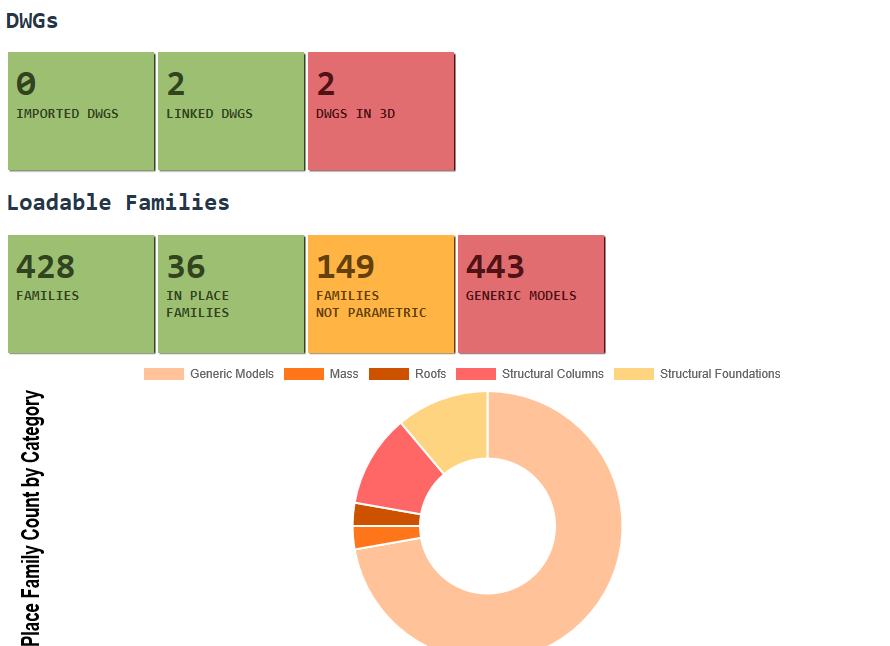
- Preflight Checks - my favourite tool: it shows the "health" of your Revit file in a nice graphical form, and what could be improved.
Pyrevit
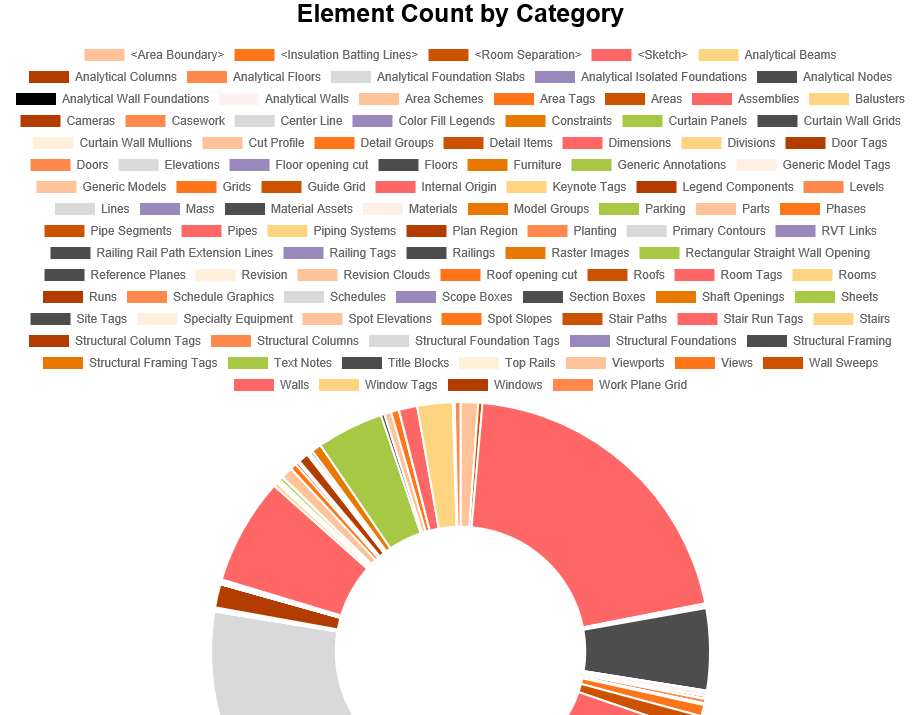
- Preflight Checks - my favourite tool: it shows the "health" of your Revit file in a nice graphical form, and what could be improved.
Pyrevit
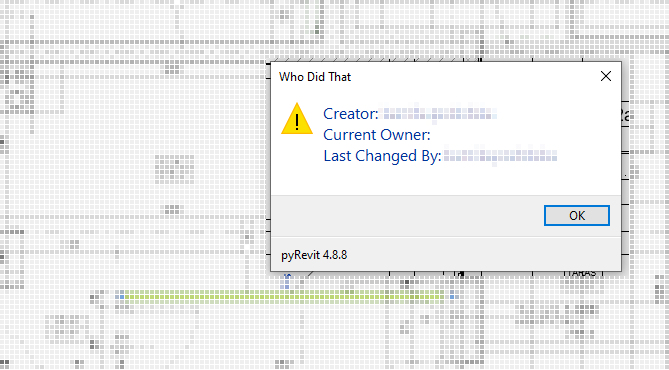
- Team - an important check: Who did that? Who created an element and who edited it last.
Session 2
Classes
What classes and inheritance are
class Person():
    def __init__(self, age, height):
        self.age = age
        self.height = height
        self.death = None
        self.dead = False

    def died(self):
        self.death = self.age
        self.dead = True


class Woman(Person):
    def __init__(self, age, height):
        super().__init__(age, height)
        self.children = None
        self.favourite_books = []


class Pilot(Woman):
    def __init__(self, age, height, experience):
        super().__init__(age, height)
        self.experience = experience
        self.airborne = False

    def take_off(self):
        self.airborne = True
Helpful Python libraries
- math
- itertools
- collections.namedtuple
- pandas
- numpy
- bokeh / plotly
- pillow
- k3d
Dynamo
- UnwrapElement
- Transaction vs. TransactionGroup vs. TransactionManager
- uidoc.Selection
- an attempt to explain the differences (imported libraries).
import clr

clr.AddReference("RevitAPI")
Autodesk.Revit.DB.Level

clr.AddReference("RevitNodes")
import Revit
clr.ImportExtensions(Revit.Elements)
clr.ImportExtensions(Revit.GeometryConversion)
Revit.Elements.Level
Dynamo IN-OUT
input_list_of_numbers = IN[0] #Here we take an input
output_list_of_numbers = [] #We create an empty list to output

for number in input_list_of_numbers: #Looping through input
    new_number = number + 1 #Adding 1 to each number
    output_list_of_numbers.append(new_number)

OUT = output_list_of_numbers #Here we output the new '+1' list
Revit Python Shell
Interactive fun
FilteredElementCollector
# Note: filters accumulate on a collector, so every query starts with a new one.

# Category
furniture_collector = FilteredElementCollector(doc).OfCategory(BuiltInCategory.OST_Furniture)

# Class
walls_collector = FilteredElementCollector(doc).OfClass(Wall)

# type or actual instance
wall_types = FilteredElementCollector(doc).OfCategory(BuiltInCategory.OST_Walls).WhereElementIsElementType()
walls_iterator = FilteredElementCollector(doc).OfCategory(BuiltInCategory.OST_Walls).WhereElementIsNotElementType()

# turning the query into a list of objects
walls = walls_iterator.ToElements()

# an example one-liner
furniture = (FilteredElementCollector(doc)
                 .OfCategory(BuiltInCategory.OST_Furniture)
                 .WhereElementIsNotElementType()
                 .ToElements()
                 )

OUT = furniture
uidoc.Selection
import clr

clr.AddReference("RevitAPI")

from Autodesk.Revit.DB import (
    ElementId,
)

clr.AddReference("System")
from System.Collections.Generic import List

uidoc = __revit__.ActiveUIDocument  # type: ignore
doc = __revit__.ActiveUIDocument.Document  # type: ignore


def select(elements, by_id=False, uidoc=uidoc):
    """select elements in view"""
    elements_by_id = []
    if not by_id:
        for el in elements:
            elements_by_id.append(el.Id)
    else:
        elements_by_id = elements
    Icollection = List[ElementId](elements_by_id)
    uidoc.Selection.SetElementIds(Icollection)
Filtering + selecting
A script that picks elements and selects them in the model
import clr

clr.AddReference("RevitAPI")

from Autodesk.Revit.DB import (
    ElementId,
    FilteredElementCollector,
    BuiltInCategory,
)

clr.AddReference("System")
from System.Collections.Generic import List

# Adding the TransactionManager and DocumentManager
clr.AddReference("RevitServices")
import RevitServices
from RevitServices.Persistence import DocumentManager

doc = DocumentManager.Instance.CurrentDBDocument
uidoc = DocumentManager.Instance.CurrentUIApplication.ActiveUIDocument

def select(elements, by_id=False, uidoc=uidoc):
    """select elements in view"""
    elements_by_id = []
    if not by_id:
        for el in elements:
            elements_by_id.append(el.Id)
    else:
        elements_by_id = elements
    Icollection = List[ElementId](elements_by_id)
    uidoc.Selection.SetElementIds(Icollection)

# an example one-liner
walls = ( FilteredElementCollector(doc)
            .OfCategory(BuiltInCategory.OST_Walls)
            .WhereElementIsNotElementType()
            .ToElements()
)

chosen = []
for wall in walls:
    if "gk" in wall.Category.Name.lower():  # "gk" = plasterboard in Polish type names
        chosen.append(wall)

select(chosen)
Session 3
Transaction
How changes are made to the model. There are three kinds of transactions:
- Transaction
- TransactionGroup
- TransactionManager - Dynamo
TransactionManager - Dynamo
TransactionManager.Instance.EnsureInTransaction(doc)
do_something()
TransactionManager.Instance.TransactionTaskDone()
Transaction
t = Transaction(doc, 'Description')
t.Start()
try:
    do_something()
except:
    t.RollBack()
else:
    t.Commit()
TransactionGroup
tg = TransactionGroup(doc, "{} number assign".format(el_type))
tg.Start()

t = Transaction(doc, "Change 1")
t.Start()
make_change1()
t.Commit()

do_something_else()

t2 = Transaction(doc, "Change 2")
t2.Start()
make_change2()
t2.Commit()

# Merging the two transactions
tg.Assimilate()
Parameters
import clr

clr.AddReference("RevitServices")
from RevitServices.Persistence import DocumentManager

clr.AddReference("RevitAPI")
from Autodesk.Revit.DB import (
  Transaction,
  UnitUtils,
  DisplayUnitType
)

doc = DocumentManager.Instance.CurrentDBDocument


wall = s0 # type: ignore
# a parameter that is a number
base_offset = wall.LookupParameter('Base Offset')
base_offset.AsDouble()      # 0.16404199475065617
base_offset.AsInteger()     # 0
base_offset.AsValueString() # '5.00'
base_offset.DisplayUnitType # Autodesk.Revit.DB.DisplayUnitType.DUT_CENTIMETERS
base_offset_cm = UnitUtils.Convert(
  base_offset.AsDouble(),
  DisplayUnitType.DUT_DECIMAL_FEET,
  DisplayUnitType.DUT_CENTIMETERS)   # 5.0


# a parameter pointing to another object
base = wall.LookupParameter('Base Constraint')
base.AsDouble()      # 0.0
base.AsValueString() # '01-Pietro_Konstrukcja'
base.AsElementId()   # <Autodesk.Revit.DB.ElementId [221444]>
level = doc.GetElement(base.AsElementId()) # <[Autodesk.Revit.DB.Level]>
level.Name # '01-Pietro_Konstrukcja'
level.Elevation # 9.1371391076115476
level.LookupParameter('another parameter')
# and so on, and so on
Parameter types
- String [str]
Building Name - Double [float]
3.14 - Integer [int]
2345 - Element - another Revit object (Level)
- BuiltInParameter
ParameterMap
How to get information about parameters
import clr

clr.AddReference("RevitServices")
from RevitServices.Persistence import DocumentManager

clr.AddReference("RevitAPI")
from Autodesk.Revit.DB import (
  Transaction,
  UnitUtils,
  DisplayUnitType
)

doc = DocumentManager.Instance.CurrentDBDocument


wall = s0 # type: ignore

parameter_names = [x.Definition.Name for x in wall.ParametersMap]
parameter_names_extended = [x.Definition.Name for x in wall.Parameters]
# Differences:
#   Type
#   Family
#   Type Name
#   Category
#   Design Option
#   Family and Type
#   Type Id
#   Family Name
#   Category
Session 4
Your own tab in Revit

An example from a bigger player in the industry
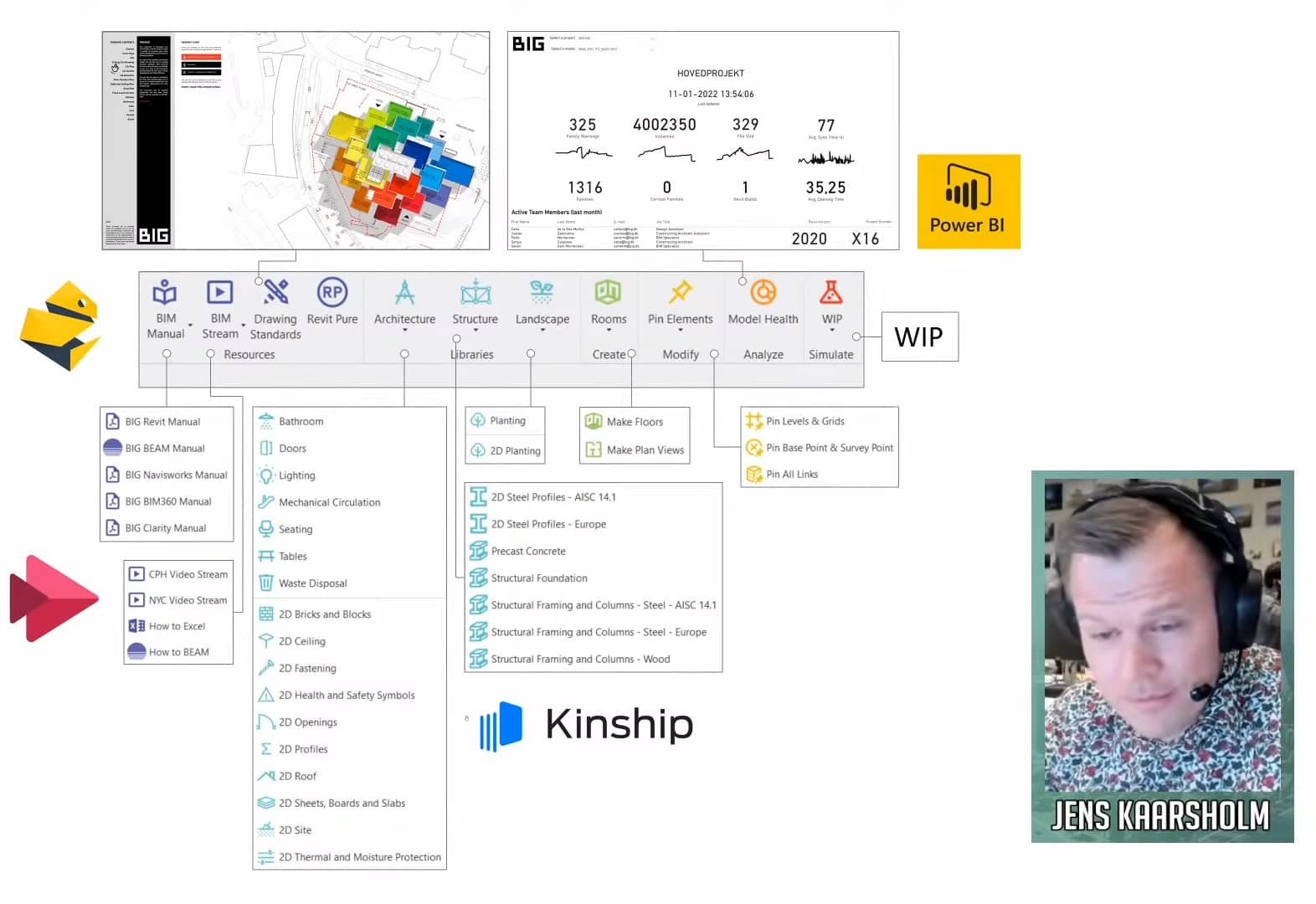
Folder structure
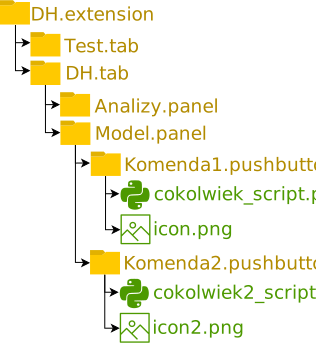
Quick launch
Session 5
Views
- View
- FloorView
- Viewport
ViewTemplates
Linked documents
def elements_from_link(doc):
    elements = []
    lnks = FilteredElementCollector(doc).OfClass(RevitLinkInstance)
    for i in lnks:
        name = i.Name.split(".rvt")[0]
        if name.endswith("IS"):  # filter the links to find the right one
            doclnk = i.GetLinkDocument()
            coll = (
                FilteredElementCollector(doclnk)
                .OfCategory(BuiltInCategory.OST_GenericModel)
                .WhereElementIsNotElementType()
                .ToElements()
            )
            for x in coll:
                if x.Symbol.FamilyName.startswith("Name"):
                    lvl = doclnk.GetElement(x.LevelId)
                    elements.append((x, lvl.Name))
    return elements
Dimensioning
import clr
clr.AddReference("RevitAPI")
from Autodesk.Revit.DB import (
    FilteredElementCollector,
    Transaction,
    XYZ,
    Line,
    Reference,
    ReferenceArray,
)


el, grid = selection
p = el.GeometryCurve.GetEndPoint(0)
p_ref = el.GeometryCurve.GetEndPointReference(0)
proj = grid.Curve.Project(p)
gr_ref = Reference(grid)

# Creating the dimension
direction = grid.Curve.Direction
p1 = XYZ(p.X, p.Y, 0).Add(direction.Multiply(0.5))
p2 = proj.XYZPoint.Add(direction.Multiply(0.5))
dimline = Line.CreateBound(p1, p2) # we created a perpendicular line
# dimline = dimline.CreateOffset(100, dimline.Direction)

refarr = ReferenceArray()
refarr.Append(p_ref)
refarr.Append(gr_ref)

t = Transaction(doc, 'DEV dimension')
t.Start()
dim = doc.Create.NewDimension(doc.ActiveView, dimline, refarr)
t.Commit()
Session 6
Comparing
x == y
Comparing values is simple for booleans and integers.
The problem starts with floating-point numbers (float), i.e. most things in 3D geometry and Revit.
- Comparisons that work:
- True == False
- 1 == 2
- Ones that do not, e.g. 2.5 == 2.4 + 0.1
In practice 2.5 == 2.5 will usually hold and come out true.
A computer always stores floats rounded, so sometimes calculations show that this equation is correct:
0.1 - 0.01 = 0.0900000000000000003
That is why, when comparing floats, vectors or points, it is worth adding a so-called epsilon.
e = 0.0001  # tolerance within which numbers count as equal
x = 0.1 - 0.01
y = 0.09

def equal(x, y, e=e):
    return abs(x - y) < e  # abs - the absolute value

equal(x, y)  # True
Hands-on together
Draw a wall
import clr

clr.AddReference("RevitServices")
import RevitServices
from RevitServices.Persistence import DocumentManager
from RevitServices.Transactions import TransactionManager

clr.AddReference("RevitAPI")
from Autodesk import Revit
from Autodesk.Revit import DB, UI
from Autodesk.Revit.DB import (
    Wall,
    Document,
    Transaction
)

# uidoc = DocumentManager.Instance.CurrentUIApplication.ActiveUIDocument
# doc = DocumentManager.Instance.CurrentDBDocument
uidoc = __revit__.ActiveUIDocument # type: ignore
doc = __revit__.ActiveUIDocument.Document # type: ignore

t = Transaction(doc, 'Create Wall')
t.Start()
try:
    Wall.Create(doc, curve, walltypeid, levelid, height, offset, flip, structural)
except:
    t.RollBack()
else:
    t.Commit()
Modify wall parameters
import clr

clr.AddReference("RevitServices")
from RevitServices.Persistence import DocumentManager

clr.AddReference("RevitAPI")
from Autodesk.Revit.DB import (
    Transaction,
    UnitUtils,
    DisplayUnitType
)

doc = DocumentManager.Instance.CurrentDBDocument

wall = s0 # type: ignore
# a parameter that is a number
base_offset = wall.LookupParameter('Base Offset')
new_offset = UnitUtils.Convert(
    15,
    DisplayUnitType.DUT_CENTIMETERS,
    DisplayUnitType.DUT_DECIMAL_FEET)


t = Transaction(doc, 'Modify wall parameter')
t.Start()
try:
    # base_offset.SetValueString('15')
    base_offset.Set(new_offset)
except ValueError:
    t.RollBack()
else:
    t.Commit()
Collect data from walls
import clr

clr.AddReference("RevitServices")
from RevitServices.Persistence import DocumentManager

clr.AddReference("RevitAPI")
from Autodesk.Revit.DB import (
    BuiltInCategory,
    FilteredElementCollector
)

doc = DocumentManager.Instance.CurrentDBDocument

# 1. one option is to use the shell's selection, "selection"
walls = selection # type: ignore

# 2. the other option is to filter all walls
walls = ( FilteredElementCollector(doc)
            .OfCategory(BuiltInCategory.OST_Walls)
            .WhereElementIsNotElementType()
            .ToElements()
)

# containers for the collected data
areas = {}
total = 0

# a loop over every wall
for wall in walls:
    wall_type = wall.LookupParameter("Family and Type").AsValueString()
    area_feet = wall.LookupParameter("Area").AsDouble()
    area_m = sqr_feet_to_meter(area_feet)  # the function from the units slide
    total += area_m
    if areas.get(wall_type):
        areas[wall_type] += area_m
    else:
        areas[wall_type] = area_m

# printing the results
for wall_type, area in areas.items():
    print('{}: {}m2'.format(wall_type, area))

print('Total area: {}m2'.format(total))
Place a family
from Autodesk.Revit.DB import (
    FilteredElementCollector,
    FamilySymbol,
    BuiltInCategory,
    Structure,
    Transaction,
    XYZ,
)

all_door_families = (FilteredElementCollector(doc)
.OfClass(FamilySymbol)
.OfCategory(BuiltInCategory.OST_Doors)
.ToElements())

family_symbol = all_door_families[0]  # take the first one
active_view = doc.ActiveView
level = doc.GetElement(active_view.LevelId)

location = XYZ(0,0,0)
structural = Structure.StructuralType.NonStructural

t = Transaction(doc, 'Place family')
t.Start()
if not family_symbol.IsActive:
    family_symbol.Activate()  # an unused type has to be activated first
# regular families: point, type, level, structural type
new_instance = doc.Create.NewFamilyInstance(location, family_symbol, level, structural)
# hosted families (e.g. a door in a wall): point, type, host, level, structural type
# doc.Create.NewFamilyInstance(location, family_symbol, host, level, structural)
# line-based families: a curve instead of a point
# doc.Create.NewFamilyInstance(curve, family_symbol, level, structural)
t.Commit()
Dimension the grids
import clr

clr.AddReference("RevitAPI")
from Autodesk.Revit.DB import (
    FilteredElementCollector,
    Grid,
    Transaction,
    ReferenceArray,
    Reference,
    Line,
    XYZ,
)

uidoc = __revit__.ActiveUIDocument  # type: ignore
doc = __revit__.ActiveUIDocument.Document  # type: ignore

# here one expression is split
# over many lines by wrapping it in parentheses
grids = ( FilteredElementCollector(doc)
    .OfClass(Grid)
    .WhereElementIsNotElementType()
    .ToElements()
)

# we want to split the grids into groups of parallel ones
groups = {}
for g in grids:
    direction = g.Curve.Direction.ToString()  # "XYZ(-1,0,0)"
    negate =    g.Curve.Direction.Negate().ToString() # "XYZ(1,0,0)"

    # Direction is the key we group by
    if groups.get(direction):
        groups[direction] += [g]
    elif groups.get(negate):
        groups[negate] += [g]
    else:
        groups[direction] = [g]

t = Transaction(doc, 'dimension grids')
t.Start()
for k, parallel in groups.items():
    if len(parallel) > 1:
        g1 = parallel[0]
        g2 = parallel[1]
        p1 = g1.Curve.GetEndPoint(0)
        p1 = XYZ(p1.X, p1.Y, 0)
        p2 = g2.Curve.Project(p1).XYZPoint

        dimline = Line.CreateBound(p1,p2)

        refarr = ReferenceArray()
        for g in parallel:
            ref = Reference(g)
            refarr.Append(ref)

        dim = doc.Create.NewDimension(doc.ActiveView, dimline, refarr)

t.Commit()